Simple FaceTracking for Kipfel (キプフェル )
- ダウンロード商品¥ 500
Simple FaceTracking for Kipfel (キプフェル ) Jerry's FaceTracking Templates을 기반으로 기본 BlendShapes 위주로 사용하여 제작된 Face Tracking Settings입니다. =============================== These Face Tracking Settings are based on Jerry's FaceTracking Templates and were created primarily using the avatar's default BlendShapes =============================== 「Jerry's FaceTracking Templates」をベースに、主にアバターのデフォルトBlendShape(基本ブレンドシェイプ)を使用して制作したFace Tracking Settingsです。
Requirements
- Original 3D Model キプフェル Kipfel / オリジナル3Dモデル https://mukumi.booth.pm/items/5813187 - VRCFaceTracking v5.0+ https://docs.vrcft.io/ - Modular Avatar https://modular-avatar.nadena.dev/
How to use
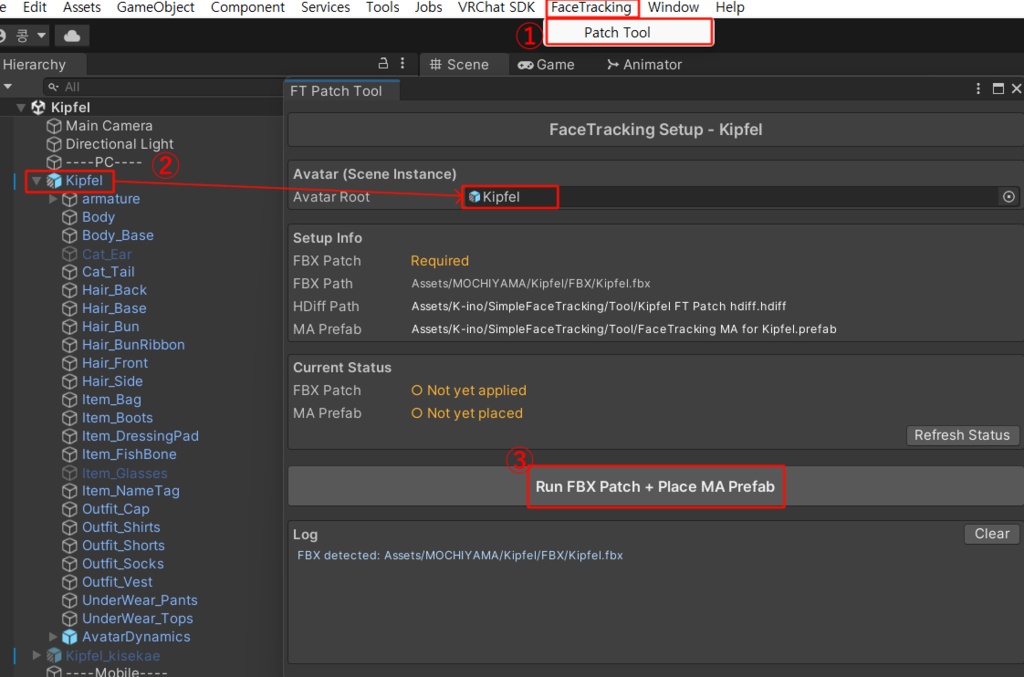
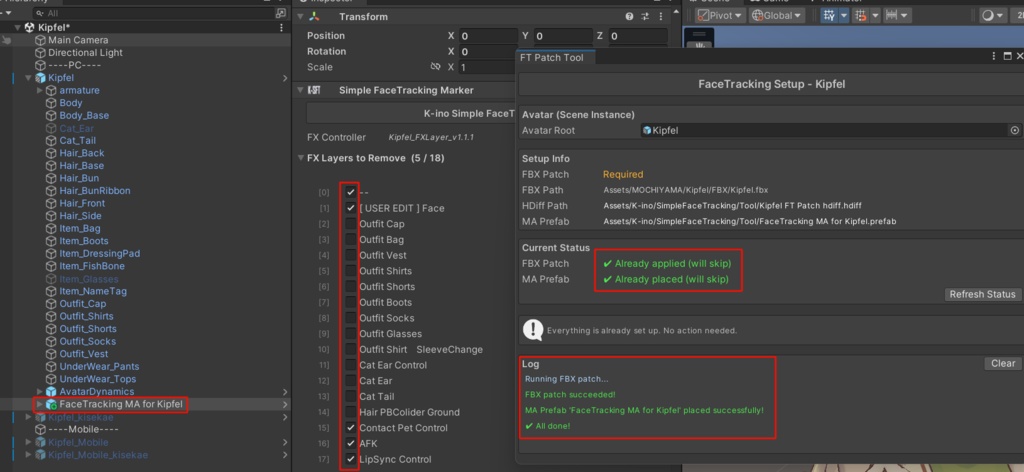
Unity 상단 탭의 FaceTracking-Patch Tool 클릭 및 사용할 Kipfel Prefab 이동 후 "Run FBX Patch + Place MA Prefab" 버튼 클릭 (FaceTracking Patch.png 참조) =============================== Click on FaceTracking-Patch Tool from the top menu in Unity. Assign (drag and drop) the Kipfel Prefab you want to use, then click the Run FBX Patch + Place MA Prefab button. (See FaceTracking Patch.png) =============================== Unity上部メニューの FaceTracking-Patch Tool をクリックします。使用するKipfelのPrefabをセット(ドラッグ&ドロップ)し、Run FBX Patch + Place MA Prefab ボタンをクリックしてください。 (FaceTracking Patch.png 参照)
About Default(Idle) Expression - 1
"Assets > MOCHIYAMA > Kipfel > Animation > Facial" 경로 아래 [kipfel_facial_default] 애니메이션 파일에 기본 표정을 설정해 주세요. *눈가 기본 표정 수정 시, FaceTracking과의 충돌 방지를 위해 (L/R)로 나뉘어진 BlendShape의 사용을 권장합니다. =============================== Please set the default expression in the [kipfel_facial_default] animation file located at the following path: "Assets > MOCHIYAMA > Kipfel > Animation > Facial" *When modifying default eye expressions, we recommend using BlendShapes separated into (L/R) to prevent conflicts with FaceTracking. =============================== 以下のパス(階層)にある [kipfel_facial_default] アニメーションファイルに、デフォルトの表情を設定してください。 "Assets > MOCHIYAMA > Kipfel > Animation > Facial" ※目元のデフォルト表情を修正する際、FaceTrackingとの干渉を防ぐため、左右(L/R)に分かれているBlendShapeの使用を推奨します。
About Default(Idle) Expression - 2
아래의 BlendShapes의 경우 FaceTracking에 사용되었기 때문에, 기본 표정에 사용해도 FaceTracking 사용 중엔 적용되지 않을 수 있습니다. =============================== Please note that the BlendShapes listed below are used for FaceTracking. Therefore, even if you include them in your default expression, they may be overridden or not applied while FaceTracking is active: =============================== 以下のBlendShapeはFaceTrackingで使用されているため、デフォルトの表情に設定しても、FaceTrackingの使用中(稼働中)は反映されない場合があります: - eye_close_left / right - eye_happy_left / right - eye_jitome_left / right - eye_joy_left / right - eye_nagomi_left / right - eye_open_left / right - eye_small
Precautions
만약 FaceTracking Patch가 적용되지 않는다면, Kipfel의 버전을 최신 버전으로 import 해주세요. 기본 BlendShapes의 조합만으로 표현하기 어려운 표정은 Tracking 되지 않습니다. 예시) - 혀, 입술의 정교한 트래킹 VRChat에서의 이용을 상정하고 제작되었습니다. Meta Quest Pro, GalaxyXR, 나래 페이셜 트래커에서 테스트되었습니다. 비정상적인 동작이 발견될 경우 Booth Message 부탁드립니다. 사용 규약은 Original Avatar Model과 같습니다. =============================== If the FaceTracking Patch fails to apply, please import the latest version of Kipfel. Expressions that are difficult to create using only a combination of the default BlendShapes are not tracked. Example: Precise tracking of the tongue and lips. This asset was created specifically for use in VRChat. Tested with: Meta Quest Pro, GalaxyXR, and Nare Facial Tracker. If you encounter any abnormal behavior or issues, please contact me via Booth Message. The terms of use are the same as those of the original avatar model. =============================== もしFaceTracking Patchが正常に適用されない場合は、最新バージョンのKipfelをインポートし直してください。 デフォルトのBlendShapeの組み合わせだけでは表現が難しい表情はトラッキングされません。 例)舌や唇の精密なトラッキングなど VRChatでの利用を想定して制作されています。 Meta Quest Pro、GalaxyXR、Nare Facial Trackerにて動作テストを行っております。 不具合や異常な動作を発見された場合は、BOOTHのメッセージにてご連絡をお願いいたします。 利用規約は、元のアバターモデルに準拠します。
Credits
[VRCFaceTracking] https://docs.vrcft.io/ [OSC mooth] https://github.com/regzo2/OSCmooth [Adjerry91] https://github.com/Adjerry91 https://adjerry91.booth.pm/ https://github.com/Adjerry91/VRCFaceTracking-Templates [Modular Avatar] https://github.com/bdunderscore
Update
v1.0.9 [2026.03.06] - 1st Release (for Kipfel v1.2.0)